GPT Image 2 is used for background removal and currently costs 3 credits at low quality. Higher quality costs are shown before generation. Free accounts get 8 credits/day; guests get 4.
AI Background Remover — Remove or Replace Any Background Free Online
Remove backgrounds from any photo with pixel-accurate AI precision. Hair strands, fur edges, transparent objects, complex silhouettes — GPT Image 2 handles them all. Replace with a solid white background, a gradient, a custom color, or describe an entirely new scene. Perfect for e-commerce, headshots, and creative compositing. Free, no sign-up required.
Why Choose AIPhotogen AI Background Remover
Four reasons creators and sellers rely on our background removal for production-quality results.
Semantic Edge Detection for Hair & Fur
GPT Image 2 understands what the subject is, not just where colors differ. Hair strands, fur, glasses chains, translucent fabric — all preserved with pixel-accurate edges that traditional color-based cutout tools miss.
Remove and Replace in a Single Step
No need to cut out first and composite later. Describe any replacement — white studio, gradient, marble, lifestyle scene — and the AI removes the old background while placing the subject onto the new one in one generation.
Marketplace-Compliant Product Cuts
Shopify, Amazon, eBay, Etsy — each platform has specific listing image requirements. Request exactly the dimensions, background color, and shadow style you need. One source photo generates multiple compliant outputs.
Transparent PNG, Solid, or Custom — Your Choice
Output a clean transparent PNG for design compositing, a pure white background for documents, or any color and style your brand requires. The prompt gives you complete creative control over the final result.
Background Removal Results — Before & After
Real outputs from the AI Background Remover. Each pair used the full prompt written in the image alt text.
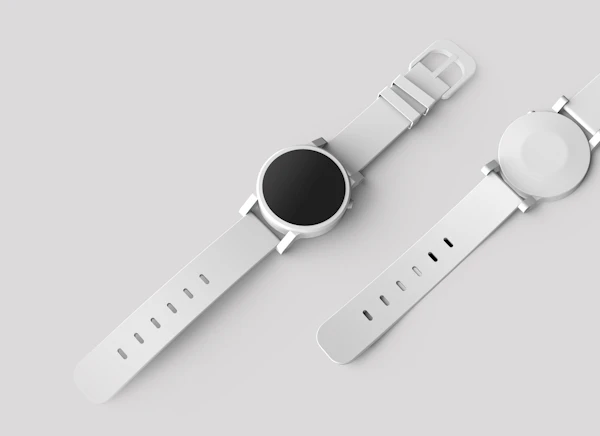
Wristwatch Removed to Pure White E-commerce Background
Prompt: Remove background completely. Place wristwatch on pure white background with soft natural drop shadow. Maintain all product detail and text. E-commerce ready, high resolution.
Portrait Curly Hair Removed to Studio Gradient
Prompt: Remove background. Replace with soft light grey gradient studio background. Preserve all curly hair strands and fine edges. Professional headshot quality, even lighting.
Pet Fur Removed to Clean White Background
Prompt: Remove background from dog photo. Carefully preserve all fur edges. Replace with clean white studio background. Natural shadow at base, pet photography style.
Sneakers Cut Out to Transparent PNG
Prompt: Remove background completely, output transparent PNG. Isolate sneakers with clean edges including all laces, mesh texture detail. For web overlay and compositing.
What You Can Do with AI Background Remover
Two core capabilities — precise cutout and creative replacement — in a single generation.
Seamless Object Removal
Hair strands, fur, translucent edges — pixel-accurate cutouts. Deliver clean white or transparent PNG outputs ready for Shopify, Amazon, and any marketplace.
Remove Background Free →Replace Any Background in One Step
Remove and replace in a single generation. Studio white, gradient, marble, lifestyle scene — describe any background and the AI delivers it while keeping the subject pixel-perfect.
Try Background Replace →Advanced AI Background Remover Features
Professional capabilities built for serious creators and high-volume workflows.
Semantic Segmentation Edge Control
The model understands subject vs. background semantically rather than by color alone. This means clean cuts around flying hair, transparent glass, translucent fabric, and complex silhouettes that defeat simple chroma-key tools.
Transparent PNG, JPG, Up to 4K
Export as transparent PNG for design compositing, standard JPG for web, or upscale the result to 4K for print. Choose the quality tier that matches your use case — 1K for drafts, 4K for production assets.
Simultaneous Remove and Replace
No multi-step pipeline needed. The AI removes the old background and composites the subject onto the new background in a single generation — faster and more consistent than manual cutout plus paste workflows.
Multiple Image Processing
Process multiple images against the same background prompt in sequence. Perfect for e-commerce catalogs, seasonal campaign refreshes, and agency production batches.
Prompt templates — ready to use
Copy any template directly into the prompt field above.
- Remove background completely. Place product on pure white background with soft natural drop shadow. Maintain all product detail and packaging text. E-commerce ready.
- Remove background. Place product on clean light marble surface with soft reflection. Add gentle drop shadow. White background above surface line. Hero shot.
- Remove background. Replace with soft peach-to-cream gradient, lighter at top. Maintain product detail. Warm lifestyle product photography tone.
- Remove background. Replace with soft light grey gradient studio background. Preserve all hair strands and fine edges. Professional headshot quality.
- Remove background. Replace with clean white studio background. Natural soft shadow at feet. Preserve all hair detail including flyaways. Editorial portrait.
- Remove background completely. Output transparent PNG. Isolate subject with clean edges including all hair detail. For web overlay and compositing.
- Remove background. Replace with soft outdoor park scene, warm afternoon light, gentle bokeh blur. Keep subject sharp. Lifestyle photography.
- Remove background. Replace with modern minimalist interior — white walls, wooden floor, soft window light from right. Clean editorial result.
- Remove background from pet photo. Carefully preserve all fur edges. Replace with clean white studio background. Natural shadow at base.
What users say about AI Background Remover
Real feedback from creators and sellers who rely on our background tool daily.
Loading reviews…
AI Background Remover — frequently asked questions
Continue After AI Background Removal
Remove first, then move the clean subject into the correct specialized workflow.
Place the Subject in an ID Photo
After isolating a portrait, use the ID Photo tool for standardized framing, background color, and document dimensions.
Create ID photo →Finish Retouching in the Photo Editor
Use the dedicated editor for object cleanup, lighting corrections, restoration, and final 4K preparation.
Open photo editor →Generate a New Product Scene
Once the subject is clean, Text to Image can create campaign backgrounds and supporting lifestyle visuals.
Generate a scene →Community works — AI background removal
Transparent PNGs and clean cutouts for products and portraits, made with the free AI background remover.
Remove background, isolate the sofa, replace with a clean white studio background, maintai…
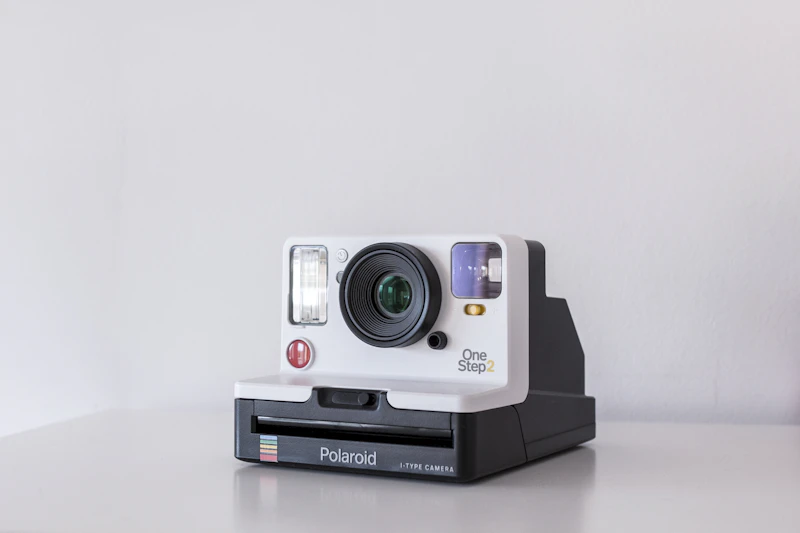
Remove background from polaroid camera product, place on soft gradient cream background, m…